





Blog
Why Choose a Low Profile CPU Cooler?
A Low Profile Cpu Cooler is designed for a specific challenge: keeping a processor cool when a tall heatsink cannot fit. In compact desktop cases, every millimeter matters. A side panel may sit close to the motherboard, while memory modules and graphics cards compete for space. The right cooler can make a small-form-factor build practical without sacrificing dependable everyday performance.
Noctua product specialist Jakob Dellinger has discussed the balance between cooler size, compatibility, and performance. A useful way to express that design principle is: “Cooling only works when the cooler fits the system.” This is not a promise that every low-profile model can handle every processor. Check the CPU’s power needs, the case’s cooler-height limit, and the memory layout before choosing. Small details matter. A few millimeters can decide whether the side panel closes.
This guide explains why builders choose low-profile designs, what trade-offs to expect, and which specifications deserve a close look. You will also see why fan noise, airflow direction, and installation clearance matter in a cramped case. A compact cooler may suit a living-room PC or a space-saving workstation, but it may run warmer under sustained heavy workloads than a larger tower cooler. That is worth considering. Product claims rarely replace careful measurements and realistic expectations.
What Defines a Low-Profile CPU Cooler?
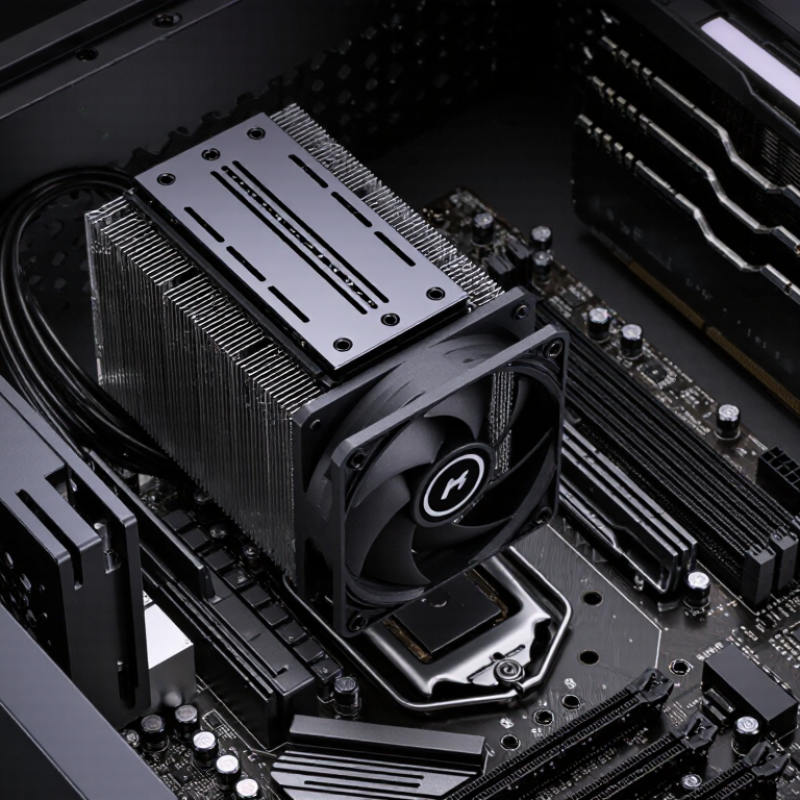
A low-profile CPU cooler is designed for cases with limited vertical clearance, including slim desktops and compact workstations. Most models use a short heatsink and a horizontal, top-down fan layout. Others use squat tower designs, so shape alone does not define the category. Height is the main measurement, but there is no universal cutoff shared by every maker. Compare the cooler’s listed height with the case limit, allowing space for the side panel and airflow. Millimeters matter.
Its design also includes the mounting hardware, fan placement, and route heat takes from the processor into the fins. Heat pipes and tightly packed fins can transfer heat effectively, but cooling depends on fan size and case ventilation. A cooler that fits may still struggle during long rendering sessions if warm air has nowhere to escape. Check RAM height and nearby motherboard components; a wide fan can overlap tall memory or limit access. Easy to miss. I would not assume a shorter cooler is automatically the safer choice; compact layouts can be surprisingly fussy. Small fans may spin faster under load, while good case airflow can improve results. Treat published temperature figures as test-specific, not guarantees for every build.
How Low-Profile Coolers Transfer Heat
Why Choose a Low Profile CPU Cooler?
How Low-Profile Coolers Transfer Heat
A low-profile cooler manages heat through a short, compact path. Heat leaves the processor’s metal lid and crosses a thin layer of thermal compound into the cooler’s base. From there, it spreads through the base and heat pipes, then reaches closely spaced fins. Small, but purposeful. Heat pipes move energy as internal fluid evaporates near the hot base and condenses in cooler sections. A fan pushes air between the fins, carrying heat away from the case.
Material and airflow both matter. The Copper Development Association reports copper’s thermal conductivity at about 400 W/m·K near room temperature, which helps explain its use in cooler bases and heat pipes. But strong conduction cannot replace fin area or fresh airflow. ASHRAE’s Handbook—Fundamentals describes convection as heat transfer between a surface and moving fluid; inside a compact case, restricted airflow can weaken that transfer. A low-profile design trades height for space, so its performance depends on case ventilation, fan speed, and processor heat output. The trade-off is easy to underestimate.
Tips: Keep intake and exhaust paths clear, and check cooler clearance before installation. Dust packed between fins can choke airflow. If temperatures remain high, inspect the case airflow too—not just the cooler.
Which PC Builds Benefit from a Compact Cooler?
Small-form-factor desktops benefit most from a low profile CPU cooler. Mini-ITX boards measure 170 × 170 mm under the Mini-ITX specification, leaving limited space for tall heatsinks and nearby components. In slim office PCs, compact living-room systems, and portable LAN-party builds, a shorter cooler can clear the side panel and memory modules.
Every millimeter matters.
Measure the case’s cooler-height limit before buying, then check clearance around the motherboard socket. A compact cooler is useful only if it fits the whole layout.
These builds often use moderate-power processors and steady airflow, rather than sustained maximum loads. That distinction matters: a small cooler may struggle with a high-wattage chip during long renders or gaming sessions. Check independent thermal-test results for the processor’s power range, and look for tests that report both temperatures and noise. Small cases can trap warm air.
A low profile cooler does not fix poor ventilation, and I’d be cautious about treating advertised compatibility as proof of quiet operation. The practical choice depends on case dimensions, workload, and the fan path—not height alone.
How to Balance Cooler Height, Cooling, and Noise
Why Choose a Low Profile CPU Cooler? How to Balance Cooler Height, Cooling, and Noise
A low-profile CPU cooler solves a real fit problem: it can clear a narrow case, nearby memory, or a side panel. But a shorter heatsink has less surface area for shedding heat. Its fan may need to spin faster under sustained loads, which can raise noise. Airflow matters. Check the case’s maximum cooler height, then leave a little clearance for installation and panel flex. A paper specification can still mislead; measure the actual space.
Balance height against your typical workload, not peak numbers alone. For gaming or office use, brief temperature spikes may matter less than steady fan noise. For long rendering sessions, cooling capacity becomes more important. ASHRAE’s 2021 thermal guidelines give 18–27°C as the recommended inlet-air range for many data-center classes; this is not a CPU limit, but it shows why warm room air can reduce cooling headroom. ISO 7779:2018 also sets controlled methods for measuring computer-equipment noise, so compare noise figures only when test conditions are similar. There is no perfect trade-off.
Tips: Measure from the motherboard to the closed side panel, and check memory height too. Compare cooler tests at similar fan speeds and ambient temperatures. A cooler that fits but sounds irritating is still the wrong fit.
Why Choose a Low Profile CPU Cooler?
How to balance cooler height, cooling, and noise
These approximate height bands are a general guide, not a formal standard or product specification. Check your case’s CPU cooler clearance before buying. Low-profile coolers suit space-constrained builds; taller designs can accommodate larger heatsinks or fans, which may improve cooling or reduce fan speed. Actual temperatures and noise depend on the cooler, CPU power, fan settings, and case airflow.
What to Check Before Choosing a Low-Profile Cooler
Why Choose a Low Profile CPU Cooler?
What to Check Before Choosing a Low-Profile Cooler
A low-profile cooler can free space in a compact case, but millimeters matter. Measure the case’s cooler-height limit and compare it with the cooler’s full height, including fan clips. Check socket compatibility and RAM clearance; a wide fin stack may cover tall memory or nearby motherboard components. Fit first. Looks later.
Cooling claims need context. Processor power limits, case airflow, and room temperature all affect results, so a thermal-design figure alone cannot predict sustained temperatures. ASHRAE’s 2021 Thermal Guidelines for Data Processing Environments recommend 18–27°C inlet air for common A1-class conditions. This is not a desktop-cooler rating, but it illustrates how warmer intake air can reduce thermal headroom. Look for independent tests using a similar processor and workload, and compare noise alongside temperatures. A cooler that seems quiet at idle may become distracting during a long render.
Tips: Check clearance with the side panel closed, confirm RAM fit on your exact motherboard, and read sustained-load test results. Leave room for airflow. I would not assume a cooler fits just because its socket is supported; that shortcut can fail.


